6 Niche but Practical Projects | Open-Source Tools & Utilities
Discover 6 niche but practical free open-source projects on GitHub: map visualization, social media algorithm, note-taking, PDF processing, desktop stats & AI image watermark removal—user-friendly & privacy-focused.
Map Poster Generator: MapToPoster
MapToPoster is a Python-based open-source tool that converts city map data into minimalist-style artistic posters, a standout in open-source map visualization tools.

The project uses OpenStreetMap to obtain geographic data and renders it via Matplotlib, allowing you to generate high-resolution map images for any city in the world. It doesn’t require a complex GIS software interface; you can create posters through simple code or command lines, making it accessible forPython beginners and design enthusiasts alike.

Moreover, it supports extensive customization with built-in themes such as film noir, clay, and cyberpunk. You can not only adjust the latitude and longitude center and coverage of the map but also customize color schemes, line thickness, and text overlay styles.
The generated maps can be used for data visualization displays or printed as physical decorative paintings. Notably, MapToPoster focuses on typography and aesthetic details, supporting multilingual font display—it can automatically detect and correctly render Chinese, Japanese, Arabic, and other languages, ensuring that city names are presented accurately and beautifully on posters. It also supports exporting images in different sizes, perfect for couple travel memorials or home decor.
Open Source Address: https://github.com/originalankur/maptoposter
X’s Algorithm: X-Algorithm
X-Algorithm is the open-source code of X’s “For You” timeline recommendation algorithm, revealing how this global social network filters, sorts, and finally displays content from hundreds of millions of tweets—an invaluable resource for social media content creators and algorithm enthusiasts.
Its core architecture includes two major links: candidate source retrieval and machine learning-based ranking. If you’re an X blogger, you must study it carefully—here are three key insights:
1. Likes are useless; conversations are king. The source code shows that likes have minimal weight, but replies—especially those from the author themselves—have a weight 75 times higher than likes or more. This indicates that the algorithm’s essence is to screen social conversations, not just popular content. For bloggers, actively replying to comments within the golden 15 minutes after posting is the only shortcut to trick the algorithm into pushing content into a larger For You traffic pool.
2. Strict vertical constraints and external link penalties exist for content forms. X uses SimClusters technology to divide users into 145,000 vertical communities; bloggers must maintain highly vertical content (e.g., only posting about AI). Frequent cross-border posting will make the algorithm unable to locate your circle, resulting in loss of recommended traffic. Additionally, the algorithm naturally rejects external links that cause users to bounce and prefers native images and videos. Therefore, always add images, always put external links in the comment section, and never deviate from your personal brand theme.
3. An account’s credibility class determines its traffic ceiling. There is a credit score-like Tweepcred mechanism inside the system; one interaction with a high-quality influencer is far better than being followed by 10,000 zombie fans. Conversely, being blocked by users will lead to devastating weight deductions and even invisible account death. In the current version, subscribing to X Premium is not only a status symbol but also a hard ticket to enter the priority ranking pool—essentially paying to buy an amulet against algorithm decay.
In summary: Reply to comments like a chatterbox, stay vertical, pay the $8 “protection fee”, and always add images.
Open Source Address: https://github.com/xai-org/x-algorithm
Personal Note-Taking Tool: Rote
Rote describes itself as a personal note-taking tool that looks different, with a philosophy of restrained and low-mental-burden recording—ideal for minimalist productivity lovers.
Rote emphasizes minimalism and focus, providing you with a pure reading and writing environment. It is not only a note-taking app but also expands its usage scenarios through an open API. You can quickly capture inspiration from anywhere, and it has a matching iOS client and Raycast extension plugin.
This openness allows Rote to seamlessly integrate into your existing workflow, handling everything from quick notes to long-form writing with ease.
Open Source Address: https://github.com/Rabithua/Rote
PDF Processing Toolbox: PDFCraft
PDFCraft is a PDF processing toolbox where all PDF operations are completed locally in your browser— a top choice for privacy-focused PDF tools.
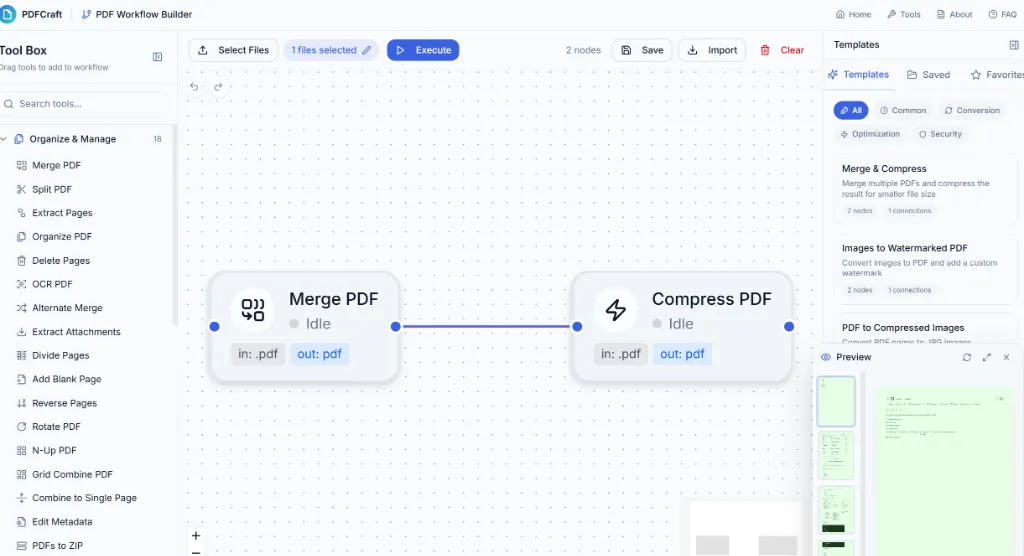
Unlike traditional online PDF conversion websites, it has no cloud servers; your PDF documents will never leave your computer, eliminating worries about privacy leaks. This project is feature-rich, integrating more than 90 practical tools. In addition to basic PDF merging, splitting, compressing, and page rotating, it also supports complex format conversions (e.g., Word, Excel, images to/from PDF), OCR text recognition, watermark addition, and metadata editing.
Its built-in workflow editor even allows users to connect multiple operations into an automated processing flow by dragging and dropping nodes. PDFCraft provides complete Docker deployment support, making it perfect for enterprises or individuals to build private PDF processing services. It supports static export and can be easily hosted on Vercel, Netlify, or any static server.
For users who want to get rid of bulky desktop software while being skeptical about the privacy of online tools, this is an ideal alternative.
Open Source Address: https://github.com/PDFCraftTool/pdfcraft
Desktop Statistics Tool: KeyStats
KeyStats helps you quantify and analyze your keyboard and mouse usage habits, a practical productivity analytics tool supporting both macOS and Windows.
It runs silently in the background, recording your daily key presses, mouse clicks, mouse movement distance, and scroll wheel distance. Data visualization is a major highlight of this project: you can quickly view the core data of the day through the menu bar or open the detailed panel to view more in-depth statistical charts.
It can generate a keyboard heatmap, intuitively showing which keys are frequently triggered—providing interesting data support for mechanical keyboard enthusiasts to optimize key layouts or programmers to analyze code input habits.
Open Source Address: https://github.com/debugtheworldbot/keyStats
Gemini Watermark Remover: GeminiWatermarkTool
GeminiWatermarkTool is a specialized tool for watermark processing of images generated by Google Gemini AI models, a must-have for AI image editing and content creators.

Its core function is to remove visible translucent watermarks automatically added by Gemini (e.g., Nano, Banana) when generating images. Through a reverse Alpha blending algorithm, the tool can accurately restore the pixels covered by the watermark, rather than smearing or repairing them via AI. It can only remove visible watermark layers, not the invisible SynthID watermark from Google DeepMind.
It can run without installing complex dependencies and provides precompiled versions for Windows, Linux, macOS, and Android. For users who need to clean AI-generated image materials or study image watermark removal algorithms, this is an efficient and transparent tool.
Open Source Address: https://github.com/allenk/GeminiWatermarkTool