4 OpenClaw-Related Projects Recommended | OpenClaw Plugins & AI Agent Tools
Discover 4 practical OpenClaw-related open-source projects: Feishu connector, Skill library, Cloudflare deployment & AI Agent memory layer—boost OpenClaw’s capabilities for AI Agent tasks, user-friendly & open-source.
Feishu Integration with OpenClaw
This open-source project is a Feishu connector for the recently popular OpenClaw, filling the gap in OpenClaw chat tool integration for Chinese users.
Although OpenClaw enables AI to control computers and run code, most of its officially supported chat software (such as Discord or Telegram) are rarely used in China. This open-source project addresses this issue, allowing your OpenClaw to run directly in Feishu.
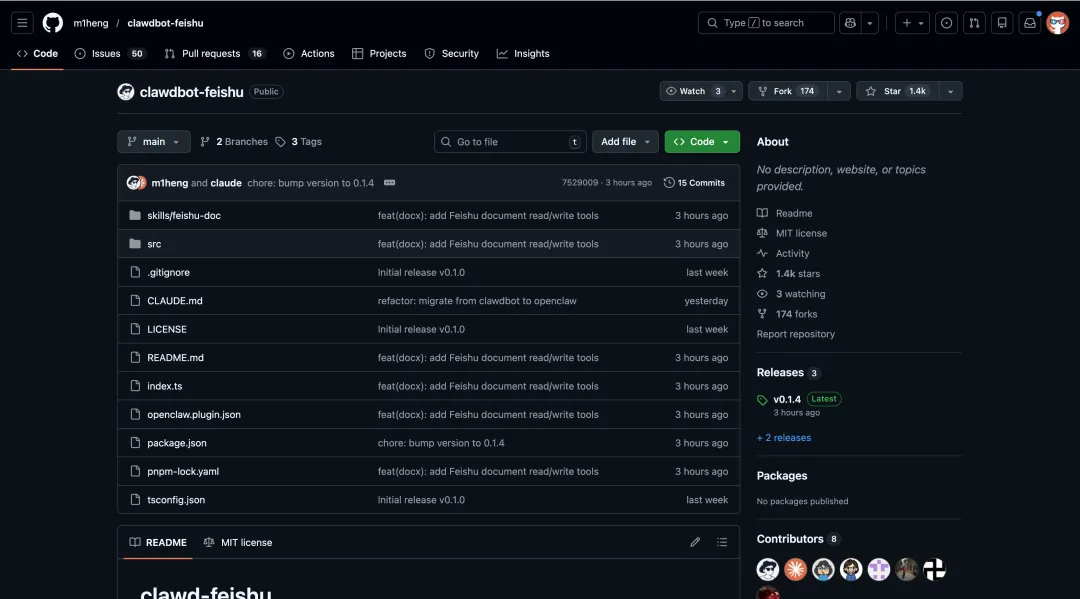
As long as you install OpenClaw on your computer and enter the robot parameters from the Feishu Open Platform, you can remotely command your home computer to work via the mobile Feishu app. Whether you ask it to search for information, monitor server status, or run an automation script, it can execute the task with a single message—no need to open another software just to chat with the AI.
Installation Method:
openclaw plugins install @m1heng-clawd/feishuThen create a custom app on the Feishu Open Platform, obtain the App ID and App Secret on the Credentials page, and enable required permissions and configure event subscriptions. For details, refer to the open-source project homepage.
Open Source Address: https://github.com/m1heng/clawdbot-feishu
Once everything is set up, simply @ it in the group—it can recognize images and files. You can directly send a PDF document, Excel spreadsheet, or a screenshot to it, and it can read and process the content directly. Replies support rich text cards, code blocks with syntax highlighting, and normal table display, making it very user-friendly.
It supports the WebSocket long connection mode. You don’t need to set up intranet penetration or have a public IP—As long as your home computer has internet access, Feishu can connect to it. In addition to sending text, it can also send files and images back to you. Combined with OpenClaw’s own capabilities, you can even use Feishu to remotely command it to generate a report file and send it back, or send a /new command to reset the context and start a new topic.
Awesome OpenClaw Skills
Simply put, this is a Skill library for the currently popular open-source AI Agent project OpenClaw, a core resource to expand OpenClaw’s AI Agent capabilities.

OpenClaw itself is an AI agent that can run locally and truly take over computer tasks, while this repository collects hundreds of Skills specifically designed to expand its capabilities, making it more than just a chatbot.
The contents here are very practical—you can find various ready-made scripts and configurations to teach AI to operate browsers for data crawling, manage local files, send emails automatically, and even write code and deploy services.
Maintained by the VoltAgent team, this project is fully organized and clearly categorized. Whether you want to use AI to handle daily chores or implement complex development workflows, browsing for ready-made tools here is definitely faster than building from scratch.
For users who are experimenting with OpenClaw, this is basically a must-see resource site.
Open Source Address: https://github.com/VoltAgent/awesome-openclaw-skills
MoltWorker
Launched by Cloudflare, this open-source project teaches you how to deploy a personal OpenClaw AI assistant in the Sandbox container environment of Cloudflare Workers, a leading solution for serverless OpenClaw deployment.
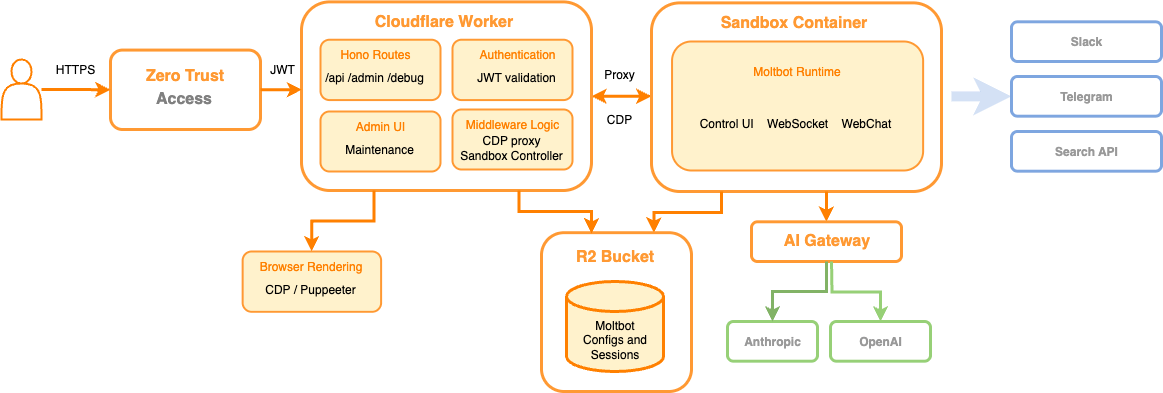
This open-source project builds a complete serverless architecture, using Cloudflare Access for secure identity authentication and R2 object storage to achieve persistence of configurations and conversation history, thus avoiding the hassle of maintaining traditional VPS servers.
In terms of functionality, it not only supports management through a web interface but also integrates with chat platforms such as Telegram and Discord. It even has built-in browser automation capabilities based on the Chrome DevTools Protocol, making it suitable for developers to quickly build low-cost private AI Agents.
Open Source Address: https://github.com/cloudflare/moltworker
OpenClaw’s Memory Layer: memU
memU is a memory layer designed for long-running AI Agents such as OpenClaw, focusing on structured memory persistence and LLM cost reduction.
It quietly organizes conversations, documents, behavior logs, and other data into structured memory in the background, accumulating little by little to help the application retain the user’s goals, preferences, and context between different sessions—no need to start from scratch every time.
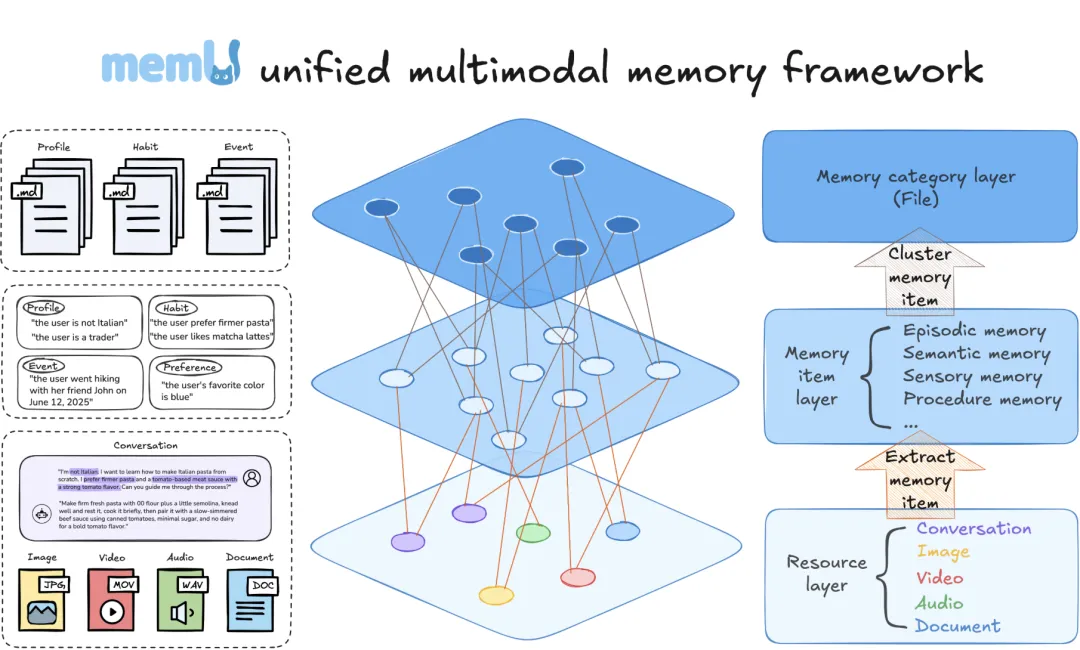
For developers, it is equivalent to adding an infrastructure dedicated to memory management outside the existing agent, which can not only reduce the number of repeated context feedings but also lower long-term LLM call costs. Internally, it divides memory into resources, entries, and categories, like a layered personal knowledge base.
From the perspective of application scenarios, it is more suitable for assistants that observe and learn alongside users: tracking your reading and search habits for a long time, actively pushing content you may be interested in; helping you remember email styles, common replies, and important contacts, automatically categorizing and drafting emails; it can also monitor investment preferences and market events, sending reminders or suggestions when trigger conditions are met.
Simply put, if you are building any agent product that needs to remember people and things, memU can handle the memory part first, allowing the upper-layer logic to focus on interaction and decision-making.
Open Source Address: https://github.com/NevaMind-AI/memU